
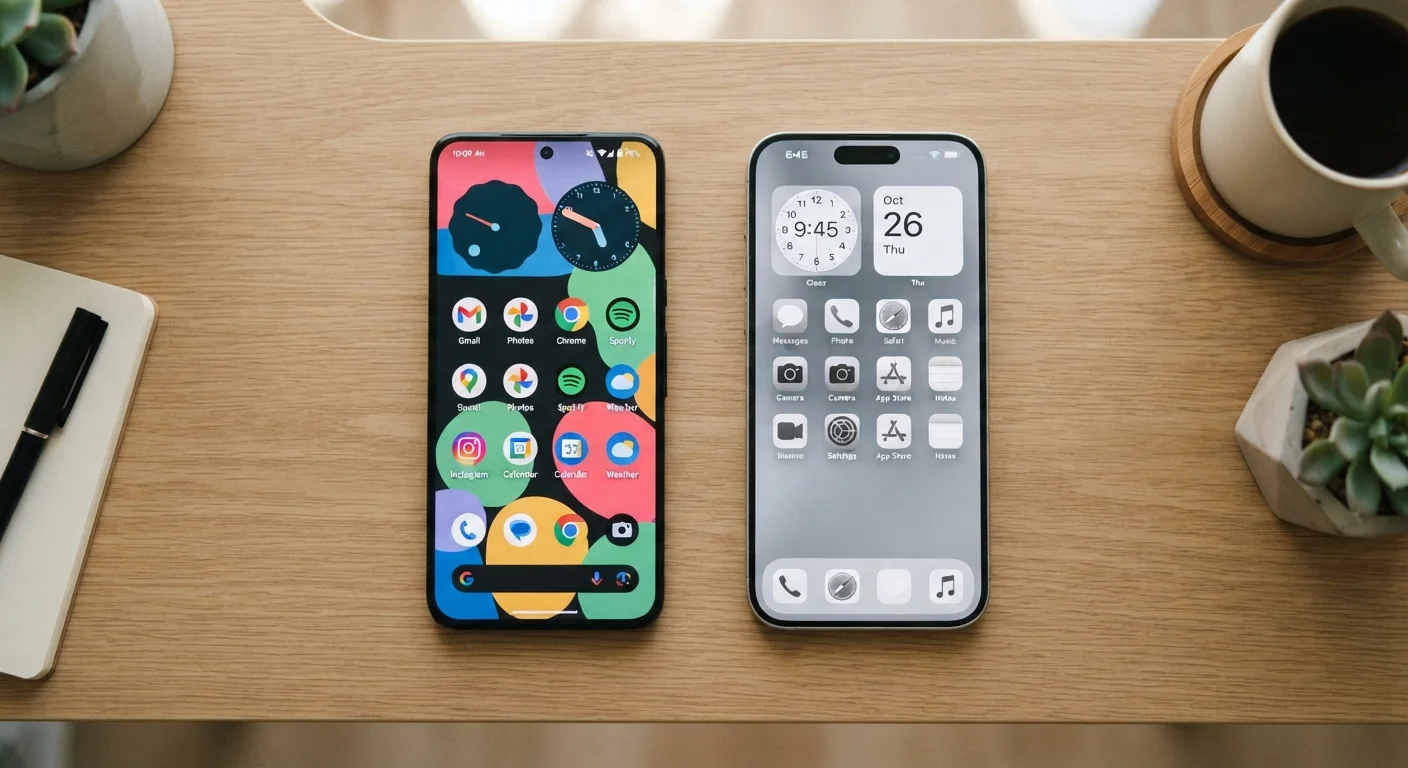
Customization and User Interface
One of the most immediately felt differences between Android and iOS is how much control each platform gives you over the look and feel of your device. Android allows users to install third-party launchers - essentially replacing the entire home-screen experience - change default browsers, email clients, and even keyboard apps system-wide. You can place widgets anywhere, leave gaps between icons, and reshape the interface to suit your workflow.
iOS has historically taken a more structured approach. Apple introduced a limited widget system and the App Library in recent versions, offering more flexibility than older iOS releases, but the core home screen still operates within tighter constraints. Icons snap to a grid, and deep system-level defaults remain restricted to Apple's own apps in many cases.
This isn't simply a matter of one being better. For users who find too many options overwhelming, iOS's consistent structure can reduce decision fatigue. For those who want their phone to work exactly the way they think, Android's openness is a genuine advantage. The comparison is similar to the desktop world - see how Windows and macOS differ for a parallel set of trade-offs.
App Ecosystems and Sideloading
Both platforms host millions of apps, and most major applications are available on each. The practical gap between the Google Play Store and Apple's App Store has narrowed considerably over the past decade. However, the underlying policies differ in ways that matter.
Apple reviews every app submission against a detailed set of guidelines, which critics argue limits developer freedom but supporters say results in more consistent quality and fewer malicious apps reaching consumers. Google's Play Store also enforces policies and conducts security scanning, though Android additionally allows sideloading - installing apps from outside the official store. This opens the door to software unavailable through Google Play but also introduces potential security risks if users aren't careful about sources.
| Criterion | Android | iOS |
|---|---|---|
| Hardware options | Hundreds of devices, many manufacturers | iPhone lineup only (Apple) |
| Home screen customization | Highly flexible, third-party launchers allowed | Structured grid, limited but improving |
| Default app flexibility | Most defaults replaceable system-wide | Some defaults replaceable; more restrictions apply |
| App sideloading | Permitted with a setting change | Restricted by default; limited in select regions |
| Software update consistency | Varies by manufacturer and carrier | Simultaneous across all supported devices |
| Cross-device ecosystem | Strong with Google services; broad compatibility | Tightly integrated with Apple hardware and services |
| App tracking transparency | Privacy Sandbox; evolving controls | App Tracking Transparency (ATT) since 2021 |
For most everyday users, both stores offer everything they need. The difference becomes relevant for power users, developers, or anyone interested in apps that don't meet one platform's specific policies.
Privacy, Security, and Software Updates
Privacy has become a defining battleground for both platforms. Apple's App Tracking Transparency (ATT) framework, introduced in 2021, requires apps to request explicit permission before tracking users across other apps and websites. Google has moved toward similar controls with its Privacy Sandbox initiative, though implementation and reach differ.
Both platforms offer robust permission controls - you can manage location access, microphone, camera, and contact permissions on either system. Reviewing these settings regularly is a worthwhile habit regardless of which platform you use. Our guide to privacy settings every smartphone owner should review covers the specifics for both.
~72%
Global smartphone OS market share held by Android
According to StatCounter global stats data, Android consistently accounts for roughly 72% of global smartphone OS usage, with iOS holding most of the remainder.
5-6 years
Typical iOS software support window per device
Apple has supported recent iPhone models with major iOS updates for five to six years, a benchmark most Android manufacturers do not consistently match.
~1.8M
Apps available on Apple's App Store
Apple reported approximately 1.8 million apps available on the App Store, comparable in scope to the Google Play Store's catalog.
Software update timelines are another meaningful difference. Apple delivers iOS updates simultaneously to all supported devices, often maintaining support for five or more years. Android updates depend heavily on the device manufacturer and carrier, meaning some phones receive major updates quickly while others lag significantly or stop receiving them altogether. This fragmentation is a known and documented limitation of the Android ecosystem.
Ecosystem Integration and Everyday Usability
Where you feel the platform difference most in daily life often comes down to ecosystem fit. If your household runs on Apple hardware - MacBooks, iPads, Apple Watch - iOS delivers seamless continuity features that genuinely reduce friction: starting a document on your phone and finishing it on your laptop, answering calls from your Mac, or sharing files instantly via AirDrop without a third-party app.
Android integrates deeply with Google services - Gmail, Google Drive, Google Photos, Maps - which are also available on iOS, though sometimes with reduced functionality. For users already embedded in Google's ecosystem, Android can feel equally cohesive. Android also generally offers broader compatibility with non-Google services and cross-platform tools.
Switching Platforms? Plan Your Data First
Moving from Android to iOS or vice versa requires migrating contacts, photos, messages, and app data - and not every app makes this easy. Both platforms offer official migration tools (Apple's 'Move to iOS' app and Google's built-in backup system), but some app data - especially game progress or messaging history - may not transfer cleanly. It's worth auditing your most-used apps before committing to a switch.
Both platforms include built-in tools to help manage screen time and digital wellbeing. Android's Digital Wellbeing dashboard and Apple's Screen Time feature offer similar capabilities - usage summaries, app limits, and focus modes. Our article on managing screen time across Android and iOS explains how each works in practice.
Ultimately, neither Android nor iOS holds a universal advantage. The right platform is the one that aligns with your hardware, habits, and priorities - and understanding where they actually differ is the foundation for making that call confidently.
