
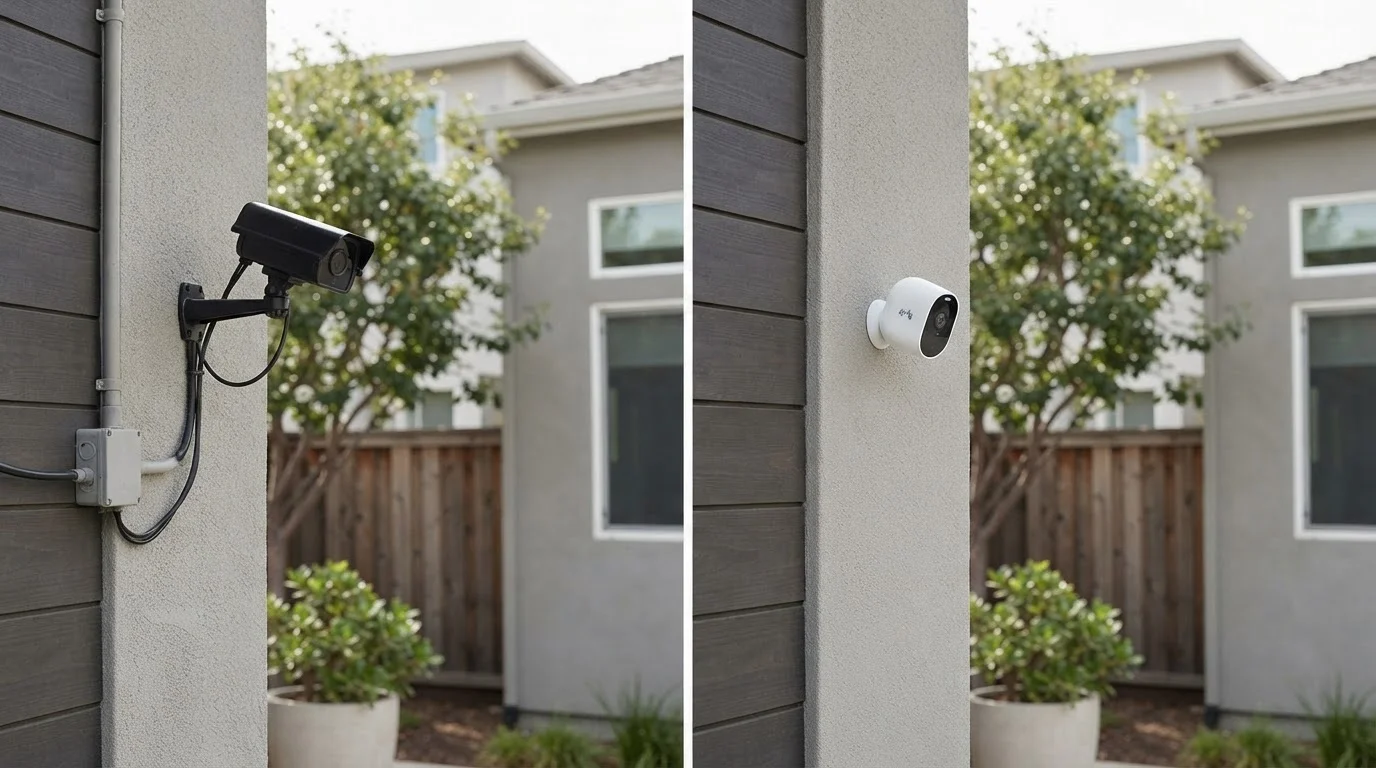
How Each System Works
Wired security cameras connect to your home's infrastructure through physical cables - typically coaxial or Ethernet - and transmit footage to a central recorder such as a Digital Video Recorder (DVR) or Network Video Recorder (NVR). Power is delivered either through a dedicated electrical line or, in many modern systems, through Power over Ethernet (PoE), which carries both data and electricity over a single cable.
Wireless cameras, by contrast, transmit footage over your home's Wi-Fi network. They are powered either by rechargeable batteries, solar panels, or a standard electrical outlet. Because they don't require data cables running to a central hub, placement is far more flexible - but the trade-off is dependence on network availability and, for battery-powered units, regular recharging.
Understanding this fundamental architecture difference is the starting point for evaluating which system fits your home. For a broader look at how your home network affects connected devices, see our guide to mesh Wi-Fi vs. traditional routers.
| Criterion | Wired Cameras | Wireless Cameras |
|---|---|---|
| Installation effort | High - cables, drilling, often professional | Low - mount and connect via app |
| Placement flexibility | Fixed once installed | Easily repositioned |
| Power source | Hardwired electrical or PoE | Battery, solar, or outlet |
| Network dependency | None for recording | Requires stable Wi-Fi |
| Ongoing maintenance | Minimal | Battery recharging, firmware updates |
| Scalability | Strong for large, multi-camera setups | Can strain home networks at scale |
| Ideal ownership status | Homeowners | Renters or frequent movers |
Installation, Flexibility, and Ongoing Maintenance
Installation complexity is one of the sharpest dividing lines between these two systems. Wired cameras typically require drilling through walls or ceilings, routing cables, and connecting to a recorder - work that most homeowners hire a licensed installer to handle. Once in place, however, they demand little ongoing attention beyond occasional software updates and lens cleaning.
Wireless cameras can usually be mounted with basic hardware and configured through a smartphone app in under an hour. That convenience comes with its own upkeep: battery-powered units need recharging every few weeks to several months depending on usage and temperature, and you'll want to periodically confirm that each camera maintains a stable connection to your router.
It's also worth noting that wireless cameras placed at range from your router may experience lag, dropped frames, or failed recordings - particularly in homes with thick walls or interference from neighboring networks. If your coverage is already uneven, improving your network infrastructure first may be a prerequisite. Our explainer on common security camera misconceptions addresses some realistic expectations around wireless reliability.
~70%
U.S. households with broadband internet
According to Pew Research Center data, approximately 7 in 10 American adults have home broadband, which is a baseline requirement for wireless camera systems to function reliably.
3-6 months
Typical wireless camera battery life
Battery life varies widely by model, motion frequency, and temperature; cold weather can significantly reduce runtime, requiring more frequent recharging cycles.
Security, Reliability, and Vulnerabilities
Neither system is immune to failure, but each has different weak points. Wired cameras don't transmit data over the air, which removes one layer of potential interception. However, they depend on consistent electrical power - a power outage will disable cameras unless backup power (such as a UPS battery) is in place. Physical tampering with cables is also a known vulnerability in older analog wired systems.
Wireless cameras transmit data over Wi-Fi, which introduces cybersecurity considerations: firmware should be kept up to date, default passwords should always be changed, and network segmentation (placing cameras on a separate network from personal devices) is a widely recommended practice among security professionals. If your home's internet goes down, most wireless cameras will stop transmitting - though some models include onboard SD card storage as a backup.
For homeowners evaluating where cameras add the most practical value room by room, our room-by-room home technology guide offers useful framing on placement priorities.
Cybersecurity Basics for Wireless Cameras
Wireless cameras connected to your home network are internet-accessible devices and should be treated with the same security hygiene as any other connected device. Always change factory-default passwords, enable two-factor authentication if available, and keep camera firmware updated. Placing cameras on a dedicated guest or IoT network - separate from your primary devices - is a straightforward step that reduces exposure if one device is ever compromised.
