
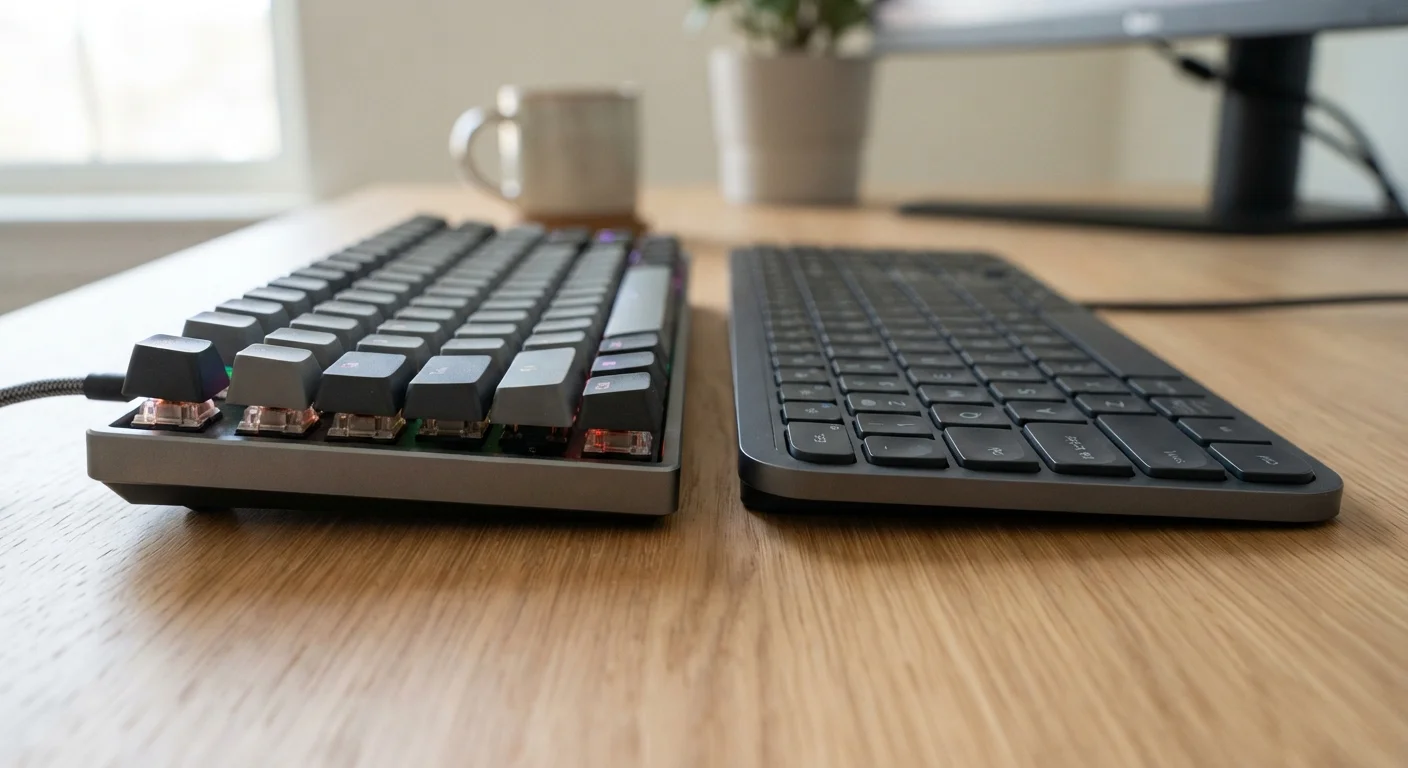
How Each Keyboard Type Actually Works
The difference between mechanical and membrane keyboards isn't just marketing language - it comes down to the physical mechanism that registers each keystroke.
In a mechanical keyboard, every key sits atop its own dedicated switch. That switch contains a spring and a stem; when pressed, the stem travels down, actuates an electrical contact, and registers the keystroke. The switch returns to its starting position via the spring. Because each switch operates independently, you feel and hear the moment of actuation clearly.
In a membrane keyboard, there's no individual switch per key. Instead, pressing a key pushes a rubber dome down through a soft membrane layer, which completes an electrical circuit on the layer beneath. The dome then springs back when released. The entire keyboard shares one continuous membrane sheet, which keeps the design flat and relatively simple.
This structural difference is why the two keyboards feel so different, even when they look similar at a glance.
| Criterion | Mechanical Keyboards | Membrane Keyboards |
|---|---|---|
| Key mechanism | Individual physical switches | Shared rubber dome membrane |
| Typing feedback | Tactile bump or click | Soft, gradual compression |
| Noise level | Moderate to loud | Quiet |
| Typical switch lifespan | 50-100 million keystrokes | 5-10 million keystrokes |
| Repairability | Individual switch replaceable | Not practically repairable |
| Price range | Generally higher | Generally lower |
| Customization options | Switch type, keycaps, layout | Limited |
| Profile / thickness | Taller keys | Slimmer, lower profile |
What the Typing Experience Actually Feels Like
Typing feel is where this distinction becomes most personally meaningful. On a mechanical keyboard, each keypress delivers clear feedback - either a tactile bump you feel mid-press, a sharp audible click, or a smooth linear travel depending on the switch type. Many typists describe it as more deliberate and satisfying, particularly for extended sessions.
Membrane keyboards, by contrast, feel softer and mushier to most users. The rubber dome compresses gradually without a defined actuation point, so you're relying on bottoming out the key - pressing it fully - to be confident the keystroke registered. For casual typing or data entry, this rarely causes issues. For fast typists who rely on partial keypresses, it can introduce minor uncertainty.
Noise is a closely related factor. Mechanical keyboards - especially clicky switch variants - can be considerably louder than membrane keyboards. Linear or tactile mechanical switches are quieter than clicky ones, but even those tend to produce more sound than a standard membrane keyboard. If you share a workspace, this is a real practical consideration. For more on managing your peripheral setup overall, see our guide on wired vs. wireless peripherals.
50-100M
Keystrokes per mechanical switch (rated)
Switch manufacturers publish standardized endurance ratings; most mechanical switches are tested to 50-100 million actuations per key.
5-10M
Keystrokes per membrane keyboard (typical)
Membrane keyboard lifespan ratings vary by manufacturer, but commonly fall in the 5-10 million keystroke range under normal use.
Durability, Maintenance, and Long-Term Value
One of the most quantifiable differences between keyboard types is rated lifespan. Most mechanical switches are rated for 50 million to 100 million keypresses per key - a figure manufacturers derive from standardized endurance testing. A typical membrane keyboard is generally rated for around 5 million to 10 million keystrokes.
In practice, this means a well-built mechanical keyboard used heavily every day may outlast several membrane replacements. Individual switches can also be replaced if one fails, which isn't practical with membrane designs. On the other hand, membrane keyboards have fewer moving parts to fail and are easier to replace inexpensively if something goes wrong.
Cleaning and maintenance also differ. Mechanical keyboards allow keycaps to be removed individually, making it easier to clean debris from between keys. Membrane keyboards are typically sealed in ways that make deep cleaning more difficult, though their flatter profiles often collect less debris overall.
If you spend significant time on a keyboard - whether coding, writing, or navigating shortcuts - those productivity habits are worth pairing with the right hardware. Our article on keyboard shortcuts that save meaningful time is a useful companion read.
Switch Types Within Mechanical Keyboards
Not all mechanical keyboards feel the same. Switches are broadly categorized as linear (smooth, no bump), tactile (bump but no click), or clicky (bump plus audible click). Each variety suits different typing styles and environments. If noise is a concern but you still want mechanical feel, tactile or linear switches are considerably quieter than clicky variants.
